The Difference Between RAM and Storage (Explained Simply)
When you buy a new phone or computer, two numbers usually appear somewhere in the specifications: RAM and storage. A laptop might have 16 GB of RAM and 512 GB of storage, while a smartphone could have 8 GB of RAM and 256 GB of storage. Because both are measured in gigabytes, it is easy to assume that they are simply two versions of the same thing.
They are not.
RAM is the temporary working memory your device uses while programs are running. Storage is the long-term space where your apps, photographs, documents, videos, operating system, and other files remain when you are not actively using them. Both hold digital information, but they perform very different jobs.
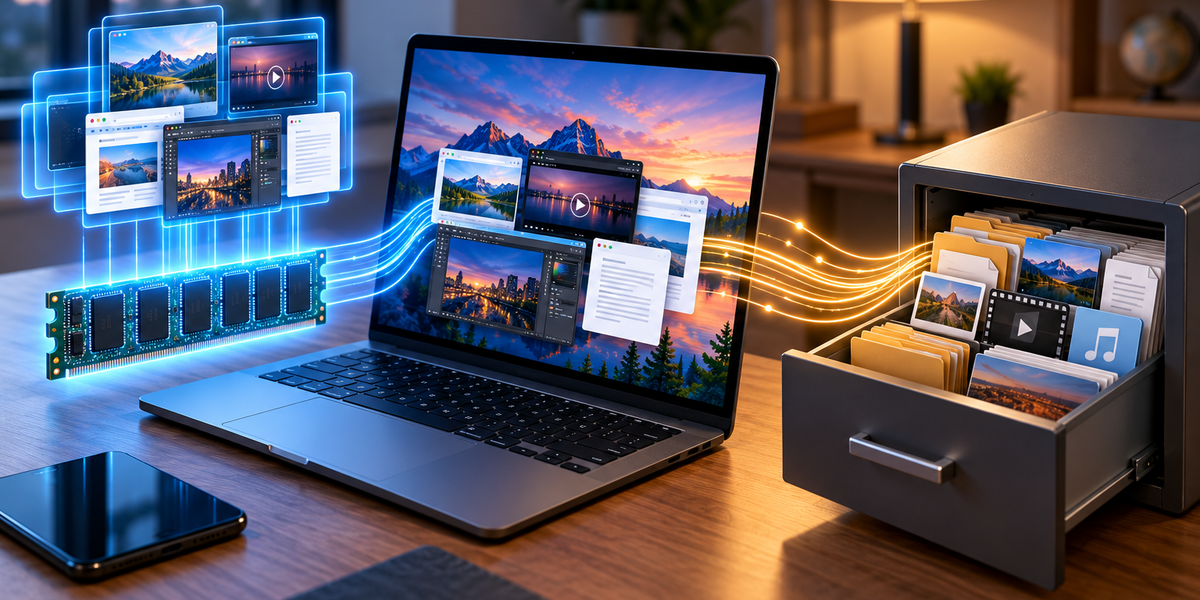
The easiest way to understand the difference is to imagine a desk and a filing cabinet. RAM is the desk where you spread out everything you are currently working on. Storage is the filing cabinet where you keep everything you want to save for later. A bigger desk allows you to work with more things at once, while a bigger filing cabinet allows you to keep more things overall.
That simple difference explains a surprising amount about why computers and smartphones behave the way they do.
What Is RAM?
RAM stands for Random Access Memory. It is a form of very fast memory that a computer or smartphone uses to hold information it needs immediately.
When you open a program, the device retrieves necessary information from storage and places working data in RAM. The processor can then access that information quickly while the program is running.
Suppose you open a web browser with several tabs, a music application, a document, and a photo editor. Each program requires memory while it operates. The operating system itself also needs RAM, as do numerous background processes that you may never see.
The more programs and data the device needs to keep active, the more RAM it uses.
This is why RAM is closely associated with multitasking. Having more RAM allows a device to keep more information immediately available without constantly removing and reloading it.
What Is Storage?
Storage is where information remains over the long term.
Your operating system is stored there. So are installed applications, photographs, videos, documents, downloads, music, messages, and other files.
Modern phones and many computers use solid-state storage based on flash memory. Desktop and laptop computers can also use SSDs and, particularly in older or high-capacity systems, traditional hard disk drives.
Unlike ordinary RAM, storage retains information when the device is turned off.
If you save a photograph today, shut down your phone, leave it powered off overnight, and turn it on tomorrow, the photograph remains available because it was written to persistent storage.
If that photograph existed only in ordinary RAM, it would disappear when the device lost power.
The Desk and Filing Cabinet Analogy
Imagine you are working on a large research project.
Your filing cabinet contains hundreds of documents. That represents storage. You can keep a large amount of information there, but you are not actively working with every document simultaneously.
Your desk represents RAM.
You take the documents you currently need from the filing cabinet and place them on your desk. Because they are directly in front of you, you can work with them quickly.
If your desk is small, you can only spread out a few documents before running out of room. You may constantly need to return one document to the cabinet before retrieving another.
If your desk is large, you can keep many documents available simultaneously and move between them easily.
A bigger filing cabinet does not make your desk bigger. Likewise, adding more storage to a computer does not automatically give it more RAM.
Why RAM Is So Much Faster
RAM is designed specifically for extremely fast temporary access.
Processors perform enormous numbers of operations every second, so they need information to be available as quickly as possible. If the processor had to retrieve every piece of working data directly from slower long-term storage, overall performance would suffer.
RAM provides a high-speed workspace between the processor and persistent storage.
Even RAM is not fast enough for every processor operation, which is why processors also contain much smaller and faster caches. Modern computers therefore use a hierarchy of memory systems.
At the top are tiny, extremely fast processor caches. Below them is larger but slower RAM. Below RAM is much larger persistent storage, which is slower again.
Each level balances speed, capacity, cost, and physical constraints differently.
What Happens When You Open an App?
Suppose you tap a social media app on your phone.
The application’s permanent files are stored in the phone’s internal storage. The operating system retrieves the code and data needed to run the application and loads relevant information into RAM.
The processor begins executing the application’s instructions using information available in memory.
As you scroll, additional photographs, videos, interface elements, and other information may be loaded into RAM. Some information might later be removed when it is no longer needed.
When you close the application, the operating system can reclaim some or all of the RAM it was using.
The application itself remains installed because its permanent files still exist in storage.
Why More RAM Helps Multitasking
Imagine opening five applications on a device with plenty of available RAM. The operating system may be able to keep much of each application’s active state in memory.
When you switch between them, they can respond quickly because their information is still readily available.
Now imagine doing the same thing on a device with very little RAM. Eventually, the operating system needs to free space.
It may remove inactive information from RAM, compress memory, move certain information elsewhere, or terminate background applications depending on the device and operating system.
When you return to an application later, it may need to reload.
This is why phones with limited RAM sometimes refresh apps when you switch back to them, while devices with more memory may preserve their state for longer.
More RAM Does Not Automatically Make Everything Faster
RAM is important, but simply adding more of it does not guarantee that every task becomes faster.
If a computer already has enough RAM for the programs you are running, adding more may make little noticeable difference.
Imagine having a desk large enough for everything you are currently working on. Doubling the size of the desk does not automatically make you write twice as fast.
The processor, graphics hardware, storage speed, software design, cooling system, and many other factors influence overall performance.
More RAM is most beneficial when insufficient memory is creating a bottleneck.
This is why specifications should be considered together rather than treating one large number as proof that a device is fast.
Running Out of RAM Is Different From Running Out of Storage
These two situations can produce completely different problems.
When a device runs low on RAM, applications may become slower, background programs may close, browser tabs may reload, or the operating system may struggle with multitasking.
When a device runs out of storage, you may be unable to save new photographs, install applications, download files, or complete software updates.
A phone can therefore have plenty of RAM while having almost no available storage, or hundreds of gigabytes of free storage while struggling because it does not have enough RAM.
They are separate resources.
Why Computers Can Use Storage as Temporary Memory
Operating systems have clever ways of coping when physical RAM becomes limited.
A computer can use part of its storage device as an extension of memory. Windows commonly uses a page file, while other operating systems use related virtual-memory and swap mechanisms.
Suppose RAM becomes crowded. The operating system can move some less immediately needed information out of physical RAM and onto storage, freeing RAM for higher-priority work.
This prevents the computer from simply failing the moment physical memory fills up.
However, storage is slower than RAM. If the system constantly needs to move information back and forth between RAM and storage, performance can decline significantly.
This is one reason a computer with insufficient RAM can feel slow even when it has a fast processor.
SSDs Have Made This Problem Less Painful
Older computers commonly relied on mechanical hard drives. Using those drives heavily as virtual memory could make a system extremely sluggish because mechanical storage was dramatically slower than RAM.
Modern SSDs are much faster than traditional hard drives, so moving memory-related data to and from storage can be less painful.
However, an SSD is still not a replacement for adequate RAM.
RAM is specifically designed to provide the extremely fast access needed for active computing. Storage is optimized for persistence and capacity.
Faster storage reduces the performance penalty when the operating system needs it, but keeping actively used information in RAM is still preferable.
What Happens to RAM When You Turn Off the Computer?
Ordinary system RAM is volatile memory, meaning it requires power to preserve its contents.
When you shut down the computer completely, the information held in RAM disappears.
This is not a problem because important information should already have been written to persistent storage.
Suppose you are editing a document. While you work, parts of the document and application are held in RAM. When you press Save, the program writes the necessary information to persistent storage.
If the computer suddenly loses power before unsaved changes have been written to storage, those changes can disappear.
That is why applications frequently save recovery information automatically.
Why Unsaved Work Can Disappear
The distinction between RAM and storage explains the classic computer disaster of losing unsaved work.
While you are editing something, the latest version may exist primarily in working memory. If the application crashes or the computer suddenly loses power, information that was never committed to persistent storage may be lost.
Modern applications try to reduce this risk through autosave and recovery features.
Cloud-based applications can go even further by continuously saving changes to remote storage.
However, the underlying principle remains the same: information must eventually move from temporary working memory into persistent storage if you want it to survive a shutdown.
How Much RAM Do You Actually Need?
The answer depends heavily on what you do with the device.
Basic browsing, email, document editing, and video streaming require less memory than professional video editing, software development, complex scientific workloads, or high-end gaming.
Operating systems and applications also become more demanding over time, which is why the amount of RAM considered comfortable gradually increases.
Having some unused RAM is not necessarily wasteful. Modern operating systems can use available memory for caching and other performance improvements, then reclaim it when applications need additional space.
The goal is not to keep RAM empty. RAM exists to be used.
What matters is having enough capacity that the system can perform your normal workload without constantly struggling to free memory.
How Much Storage Do You Need?
Storage requirements depend more on what you keep than on how many applications you run simultaneously.
Photographs and ordinary documents may require relatively little space individually, while high-resolution videos, modern games, professional creative projects, and large application libraries can consume enormous amounts of storage.
The operating system itself also occupies part of the advertised capacity.
A device sold with 256 GB of storage will not normally provide all 256 GB as completely empty space for personal files because system software and formatting require some of that capacity.
Cloud storage can reduce pressure on local storage by keeping some information remotely, but files that need to remain available offline still require space on the device.
Does More Storage Make a Device Faster?
Not necessarily.
Storage capacity and storage speed are separate characteristics.
A 2 TB storage device does not automatically perform faster than a 512 GB device simply because it holds more information.
However, the type and performance of storage can significantly affect how fast a computer feels. Faster storage can reduce boot times, make applications launch more quickly, speed up file transfers, and improve tasks that constantly read or write large amounts of data.
Storage can also perform poorly when it becomes extremely full, depending on the technology and system.
So storage matters for performance, but “more gigabytes” and “faster” are not the same thing.
Why Phones Advertise Storage More Than RAM
Storage capacity is usually more visible to consumers because it directly determines how many apps, photographs, videos, and files can fit on the device.
Manufacturers therefore prominently advertise options such as 128 GB, 256 GB, 512 GB, or 1 TB.
RAM is often less visible because mobile operating systems manage memory aggressively in the background. Users are not expected to manually decide which information belongs in RAM.
However, RAM still has a major influence on how smoothly a phone handles demanding applications and multitasking.
Two phones with similar storage capacity can therefore behave very differently if their processors, RAM, software optimization, and storage performance differ.
Why You Cannot Simply Download More RAM
The old joke about “downloading more RAM” works because RAM is physical hardware.
You can download software and files into storage, but you cannot download additional physical memory chips through the internet.
Some computers allow RAM modules to be replaced or upgraded. Many modern laptops and almost all smartphones have memory permanently integrated into the device, making upgrades difficult or impossible after purchase.
Some phones advertise features sometimes described as virtual RAM or memory expansion. These systems reserve part of the device’s storage for memory-related tasks.
They can occasionally help with memory management, but they do not transform storage into physical RAM with identical performance.
The underlying hardware difference remains.
RAM and Storage Work Together Constantly
Although RAM and storage perform different jobs, a computer constantly moves information between them.
Applications begin in storage. When you open them, necessary information moves into RAM. While you work, the processor reads and modifies information in memory. When something needs to be preserved, the relevant data is written back to storage.
This cycle happens continuously.
Opening a photograph moves information from storage into working memory. Editing it changes information being processed in RAM. Saving the edited image writes the result back to storage.
The distinction between RAM and storage is therefore not that one contains useful information and the other does not. The difference is how quickly the information needs to be available and whether it must survive when power disappears.
Think of RAM as Your Workspace and Storage as Your Archive
The simplest explanation remains the most useful.
RAM is your workspace. It holds the things your computer needs right now. More RAM gives the system more room to work with multiple programs and larger amounts of active information.
Storage is your archive. It holds the things you want to keep. More storage gives you room for more applications, photographs, videos, documents, games, and other files.
RAM is faster but temporary. Storage is slower but persistent.
A computer needs both.
Without enough RAM, the system struggles to keep active tasks readily available. Without enough storage, there is nowhere to permanently keep all your software and files.
The next time you see a laptop advertised with “16 GB RAM, 512 GB SSD,” those numbers should no longer look like two different measurements of the same resource. The 16 GB describes the size of the machine’s high-speed workspace. The 512 GB describes the size of its long-term digital filing cabinet.
One helps determine how comfortably the computer can work. The other determines how much it can keep.