How Game Consoles Actually Work Inside
Press the power button on a modern game console, choose a game, and within seconds you can be standing inside an enormous virtual city, racing a car at hundreds of kilometers per hour, exploring another planet, or competing online against someone on the other side of the world.
From the outside, the console seems almost simple. There is a box connected to a television, a controller in your hands, and perhaps a disc or downloaded game stored somewhere inside.
Underneath that simplicity is a specialized computer performing billions of calculations every second.
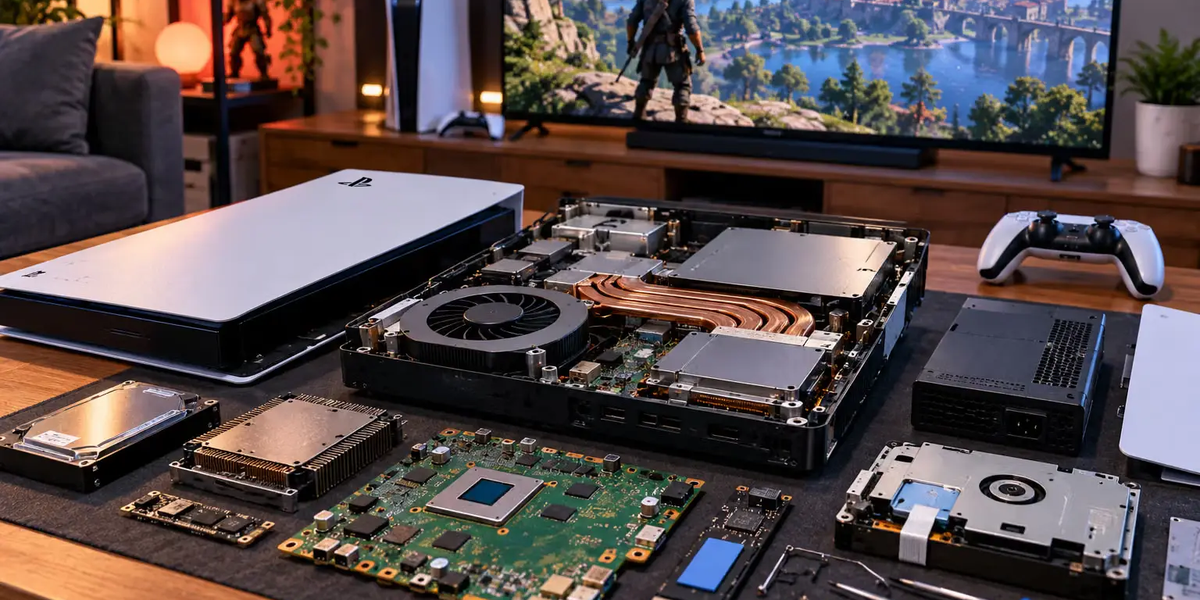
Modern game consoles contain many of the same fundamental components found inside ordinary computers: a central processor, graphics processor, memory, storage, networking hardware, cooling systems, and an operating system. The major difference is that these components are designed around one central purpose: running games consistently and efficiently.
Understanding what happens inside a console also explains why games need enormous amounts of storage, why loading screens exist, why consoles have fans, why frame rates matter, and how pressing a button on a controller eventually becomes movement on a television screen.
A Game Console Is Basically a Specialized Computer
At the most fundamental level, a PlayStation, Xbox, or similar console is a computer.
It receives information, executes software instructions, performs calculations, stores data, connects to networks, and generates graphics and audio.
The important difference is specialization.
A general-purpose PC may need to support thousands of hardware configurations and countless types of software. A console manufacturer can design around a relatively small number of known hardware configurations.
Game developers therefore know much more precisely what hardware their software will run on.
This allows them to optimize games aggressively for specific processors, memory systems, storage technology, and graphics capabilities.
It is one reason consoles can sometimes produce impressive results even when their raw hardware specifications do not appear dramatically different from comparable computers.
The Processor Runs the Game’s Logic
The central processing unit, or CPU, handles many of the calculations that determine what is happening inside a game.
Imagine playing an open-world action game.
The CPU may be calculating how non-player characters behave, whether two objects collide, what happens when you press a button, how vehicles move, which scripted events should occur, and countless other pieces of game logic.
The CPU also helps coordinate the operating system and other processes running alongside the game.
Modern CPUs contain multiple processing cores, allowing different workloads to be handled in parallel.
A game might distribute artificial intelligence, physics, animation, audio, and other systems across available processing resources rather than asking one core to do everything sequentially.
The GPU Creates the Images
If the CPU determines much of what is happening in the game, the graphics processing unit, or GPU, is largely responsible for turning that world into the images you see.
A modern game’s environment is built from enormous amounts of mathematical and visual information.
The GPU calculates how three-dimensional objects should appear from the player’s viewpoint. It processes geometry, textures, lighting, shadows, reflections, particles, transparency, and many other visual effects.
It then produces the individual frames sent to your display.
This workload is extremely demanding because it must happen repeatedly, often 30, 60, 120, or more times every second.
The GPU is designed specifically to perform huge numbers of similar calculations simultaneously, making it much better suited to graphics workloads than a general-purpose CPU.
CPU and GPU Have to Work Together
The CPU and GPU perform different jobs, but games depend on them cooperating constantly.
Suppose you are playing a racing game.
The CPU calculates information about the race. It determines vehicle physics, opponent behavior, collisions, input from the controller, and the current state of the game.
The GPU receives the information necessary to draw the scene. It determines how the cars, track, weather, lighting, shadows, and other visual elements should appear.
If either component becomes overwhelmed, performance can suffer.
A game can therefore be CPU-limited or GPU-limited depending on which workload is preventing the system from producing frames more quickly.
Developers spend enormous amounts of time balancing these workloads.
Modern Consoles Combine Major Components Efficiently
Instead of placing every major processing component on completely separate chips, modern consoles can use highly integrated designs that combine important computing functions.
This approach reduces the distance information needs to travel and can improve efficiency.
Console manufacturers work with chip designers to create processors tailored to the system’s requirements.
Because the hardware is fixed, developers can learn its strengths and limitations extremely well.
Over the lifetime of a console generation, games often become more technically impressive even though the physical hardware has not changed.
Developers simply become better at using it.
RAM Is the Console’s Working Memory
Games need somewhere to keep information that is actively being used.
That is the role of RAM.
When you load a game, important information moves from long-term storage into high-speed memory so the processor and graphics hardware can access it quickly.
This might include textures, character information, geometry, animation data, audio, game logic, and information about the area surrounding the player.
RAM is much faster than ordinary long-term storage but has limited capacity.
Developers therefore cannot simply load the entire game into memory.
They constantly decide what information needs to be available right now and what can remain in storage until later.
Storage Holds the Actual Game
The game itself lives on persistent storage.
Modern consoles increasingly rely on fast solid-state drives, or SSDs.
The difference between an SSD and an older mechanical hard drive has had a major impact on game design.
Traditional hard drives use spinning magnetic platters and mechanical read/write heads. Retrieving information from different locations can therefore involve physical movement.
SSDs have no mechanical read/write head and can access information far more quickly.
This dramatically reduces the time required to move game data into memory.
The result is not merely shorter loading screens. Fast storage can influence how entire game worlds are designed.
Why Old Games Had So Many Loading Screens
Older games were heavily constrained by storage speed.
Imagine walking through a door into a new area. The console might need to retrieve new textures, characters, audio, and environmental information before gameplay could continue.
If storage could not provide that data quickly enough, the game had to make the player wait.
Developers became creative at hiding these delays.
A loading screen was the most obvious solution, but games also used elevators, narrow corridors, slowly opening doors, long animations, and characters squeezing through tight spaces.
While the player watched the animation, the console quietly loaded the next section.
Some of these techniques are still used today, but faster SSDs have made seamless transitions much easier.
Modern Games Stream Data Constantly
Large modern games often do not load an entire world before you begin playing.
Instead, they stream information from storage while you move.
Imagine driving quickly through a huge city.
The console does not necessarily keep every building, vehicle, pedestrian, texture, and sound in the entire city loaded at maximum quality.
It prioritizes the area around you.
As you move forward, new information is loaded. Information far behind you may be removed from memory to make room for what comes next.
This process happens continuously.
Fast SSDs make it possible to stream enormous amounts of data quickly enough that players often never notice.
Why Games Take Up So Much Storage
Modern games can require tens or even hundreds of gigabytes because visual and audio assets have become enormously detailed.
High-resolution textures consume storage. Detailed character models consume storage. Large environments, voice recordings, cinematic sequences, animations, music, and multiple language packs all add to the total.
Higher-quality assets generally require more data.
Games may also store information in ways designed to improve loading performance, although modern compression and storage technologies continue to evolve.
Updates add another layer. A game that was relatively small at launch may grow substantially after years of new maps, characters, expansions, and other content.
The visual richness of modern gaming has a very real storage cost.
The Operating System Runs Behind the Game
A console does not simply turn on and immediately execute one game.
It has an operating system.
The operating system manages accounts, storage, networking, controllers, downloads, security, applications, updates, achievements, screenshots, video capture, and the interface you see before launching a game.
Some system resources are therefore reserved for the operating system even while a game is running.
The console must be capable of receiving notifications, maintaining network services, and supporting certain background features without disrupting gameplay.
Modern consoles are therefore much closer to complete computing platforms than the relatively simple game machines of early generations.
What Happens When You Launch a Game?
When you select a game, the operating system verifies that the software can run and begins loading the required information.
Program code and assets are retrieved from storage. Necessary information is placed into RAM. The CPU begins executing game instructions, while the GPU prepares to render graphics.
The game initializes audio systems, input systems, networking features, saved data, and other components.
If the game connects to online services, authentication and network connections may also occur.
Eventually, enough information has been loaded for the game to display its menu or begin gameplay.
What looks like one button press actually triggers an enormous sequence of software and hardware operations.
What Happens When You Press a Controller Button?
Suppose you press the jump button.
The controller detects the physical input and converts it into digital information.
That information is transmitted to the console, usually through a wireless connection or USB cable.
The game’s input system receives the command.
The CPU determines what the button means in the current context. If your character is allowed to jump, the game changes the character’s state and calculates the movement.
Physics and animation systems determine what happens next.
The GPU receives updated information about the character’s position and draws the next frames accordingly.
Those frames are sent to the television.
Light from the television reaches your eyes.
All of this can happen within a tiny fraction of a second.
Input Lag Is the Delay You Can Feel
The time between pressing a button and seeing the result is called input latency or input lag.
Several stages contribute to it.
The controller needs to detect the input and transmit it. The game needs to process it. The CPU and GPU need to produce a new frame. The console sends that frame to the display, and the television must process and show it.
Each stage adds a small delay.
For casual games, tiny differences may be almost impossible to notice.
In competitive fighting games, shooters, racing games, and esports, milliseconds can matter.
This is why gaming monitors and televisions often include low-latency modes that reduce unnecessary image processing.
Frame Rate Determines How Often the Image Updates
Games are not actually showing continuous movement.
They display a rapid sequence of still images called frames.
If a game runs at 30 frames per second, the console produces approximately 30 images every second. At 60 frames per second, it produces about 60. At 120 frames per second, approximately 120.
Higher frame rates can make motion appear smoother and can reduce the delay between player input and visible response.
But producing more frames requires more processing power.
The GPU has much less time to create each image at 120 FPS than at 30 FPS.
Developers therefore make tradeoffs between frame rate and visual quality.
Resolution Is Another Major Tradeoff
Resolution describes how many pixels make up the image.
A 4K image contains far more pixels than a 1080p image.
More pixels can produce greater visual detail, but the GPU has to calculate what should appear in every one of them.
That increases the workload dramatically.
This is why many console games offer different graphical modes.
A quality mode might prioritize higher resolution, more detailed effects, or advanced lighting while running at a lower frame rate.
A performance mode may reduce some visual settings to achieve smoother gameplay.
Neither approach is automatically better. It depends on what the player values and what type of game is being played.
Ray Tracing Makes Light More Realistic
Traditional game graphics use clever approximations to simulate lighting efficiently.
Ray tracing introduces techniques that model aspects of how light interacts with virtual environments more realistically.
The system can calculate how simulated rays interact with surfaces, helping produce more convincing reflections, shadows, and lighting.
The problem is computational cost.
Accurately simulating huge numbers of light interactions is extremely demanding.
Modern console hardware can accelerate certain ray-tracing calculations, but developers still need to balance visual quality against performance.
That is why enabling advanced ray-tracing effects can sometimes reduce frame rate or resolution.
Games Use Tricks to Look Better Than the Hardware Should Allow
Game developers rarely render every part of a scene at maximum complexity.
That would waste enormous amounts of computing power.
Objects far from the player can use simpler models because tiny details would not be visible anyway. This technique is commonly associated with levels of detail, or LODs.
Objects outside the camera’s view may not need to be rendered at all.
Shadows and reflections can use approximations. Certain effects can be calculated at lower resolutions. Modern reconstruction techniques can create a higher-resolution-looking image from a lower-resolution internal render.
Games are filled with these optimizations.
The goal is not to calculate everything perfectly.
The goal is to calculate what the player will notice.
The Cooling System Is Essential
Billions of calculations generate heat.
The CPU, GPU, memory, storage, and power-management hardware all produce heat while the console operates.
If that heat is not removed, temperatures can rise enough to reduce performance or damage components.
Modern consoles therefore contain substantial cooling systems.
Heat sinks absorb and spread heat away from processors, while fans move air through the console and carry heat outside.
Some systems use sophisticated thermal materials and carefully engineered airflow paths.
The cooling system is one reason consoles have vents and why blocking those vents is a bad idea.
The fan is not an optional accessory. It is part of what allows the processor to continue running at high performance.
Why Consoles Sometimes Get Loud
When the console is working harder or becoming warmer, the cooling system may increase fan speed.
Faster fans move more air but create more noise.
Dust can also reduce cooling efficiency by restricting airflow or accumulating around cooling components.
Environmental conditions matter too. A console placed inside a tightly enclosed cabinet may have difficulty removing hot air.
Good ventilation helps the cooling system do its job.
A quiet console is not necessarily doing less work. It may simply have a more efficient cooling design.
The Power Supply Feeds Everything
A console’s components require carefully controlled electrical power.
The power supply converts electricity from the wall into forms the internal electronics can use.
Different parts of the console require different voltages and power levels, and those requirements change depending on what the system is doing.
Sitting at the home screen requires less processing than running a graphically demanding game.
Power-management circuitry continuously regulates electricity while trying to balance performance, heat, and efficiency.
This is another reason modern consoles are far more sophisticated than a simple box that “runs games.”
Controllers Are Computers Too
Modern game controllers contain surprising amounts of technology.
They may include wireless communication hardware, rechargeable batteries, motion sensors, microphones, speakers, touch-sensitive surfaces, vibration motors, and processors.
Advanced haptic systems can create different physical sensations depending on what happens in the game.
Adaptive triggers can even change resistance electronically.
When a game makes a controller feel different while driving across gravel, drawing a bow, or firing a weapon, software is controlling physical components inside the controller in real time.
The controller has evolved from a collection of buttons into an interactive output device as well as an input device.
How Online Multiplayer Works
When you play online, your console communicates with servers and other systems through the internet.
Your actions need to be transmitted across the network, while information about other players needs to return.
This creates another type of delay: network latency.
If another player is thousands of kilometers away, information cannot arrive instantly. Even data traveling through fiber-optic networks is limited by physics and must also pass through routers and network infrastructure.
Online games use sophisticated techniques to hide or compensate for these delays.
They may predict movement, interpolate between updates, synchronize game states, and correct differences between what different players’ consoles believe is happening.
Smooth online multiplayer is therefore partly an illusion created by clever networking software.
Why Games Need Updates
Modern games are enormously complicated pieces of software.
Bugs are inevitable.
Developers release updates to fix problems, improve performance, rebalance gameplay, patch security issues, and add new content.
Online games may evolve continuously for years.
Console operating systems also receive updates to add features, improve stability, support new hardware, and address security vulnerabilities.
This means the console you own several years after launch may run considerably different software from the machine originally released.
The hardware stays largely the same, but the software ecosystem continues evolving.
Why Consoles Cannot Be Upgraded Like Most Gaming PCs
Desktop gaming computers are generally modular.
A user may replace the graphics card, add RAM, install more storage, or upgrade the processor depending on the system.
Consoles deliberately sacrifice much of that flexibility.
The advantage is standardization.
Developers can target a known hardware configuration rather than accounting for thousands of possible combinations.
This simplifies optimization and gives consumers confidence that a game labeled for their console should run on that machine.
Storage expansion is sometimes supported, but the core processor and graphics hardware are generally fixed for the life of the system.
That limitation is also one of the console’s greatest strengths.
Why New Console Generations Exist
Eventually, software ambitions exceed what existing hardware can comfortably deliver.
Developers want larger worlds, more sophisticated simulations, better graphics, faster loading, improved artificial intelligence, and higher frame rates.
Manufacturers respond with a new generation of hardware.
The jump between generations is not always as visually dramatic as it once was because graphics have already become highly sophisticated.
Modern improvements may instead appear in lighting, world density, physics, loading speed, animation, resolution, frame rate, and the number of systems operating simultaneously.
A new generation essentially provides developers with a larger technical budget.
What they do with that budget determines whether players notice.
Backward Compatibility Is More Complicated Than It Looks
It might seem obvious that a powerful new console should automatically run every game made for an older machine.
Unfortunately, software is often designed around specific hardware behavior.
Older consoles may use different processor architectures, graphics systems, operating environments, and storage assumptions.
Running old games on new hardware can therefore require compatibility layers, emulation, patches, or other engineering solutions.
Modern console manufacturers have invested heavily in backward compatibility because digital game libraries have become increasingly important.
Players now expect their purchases to survive hardware transitions whenever possible.
That expectation is gradually changing how console generations work.
A Console Is Designed Around Predictability
The greatest advantage of a game console may be predictability.
A developer knows what processor is inside it. They know the graphics architecture, memory capacity, storage performance, controller features, and operating environment.
They can spend years learning exactly how to extract more performance from those components.
The consumer benefits from the same predictability.
You generally do not need to compare graphics cards, configure drivers, choose memory speeds, or wonder whether your processor meets the minimum requirement for a game made specifically for your console.
You insert or download the game and expect it to work.
That simplicity is carefully engineered.
What Really Happens When You Play
Imagine pressing a button to make a character jump across a gap.
The controller detects your finger and sends a digital signal to the console. The CPU interprets the command and updates the game’s internal simulation. Physics calculations determine the character’s movement. Animation systems select the appropriate motion. The GPU calculates the character, environment, lighting, textures, shadows, and effects from the current camera position.
Information moves between storage and RAM as the game prepares upcoming areas. Audio hardware processes the sound of the jump. Networking systems may send the action to an online server. The GPU finishes the next frame and sends it through the video connection to your television.
The television displays the image.
You see the character jump.
Then the entire process happens again for the next frame, and the next one, potentially dozens or hundreds of times every second.
That is what a game console really does.
It performs an enormous stream of calculations quickly enough that individual images become movement, mathematical rules become physics, digital files become worlds, and a plastic controller in your hands feels connected to something happening inside a screen.
The remarkable achievement of a console is not simply that it contains powerful hardware. It is that all of that hardware works together quickly and consistently enough that eventually you stop noticing the computer entirely.
You just play the game.