The Difference Between Hardware, Software, and Firmware
Every digital device you use depends on several different layers of technology working together. Your phone has a screen you can touch, apps you can open, and internal instructions that help the device start correctly before those apps even appear. A laptop has a keyboard and processor, an operating system such as Windows or macOS, and lower-level code responsible for controlling important components. Even devices that do not look much like computers, including televisions, washing machines, cars, routers, cameras, and smart thermostats, rely on similar combinations of technology.
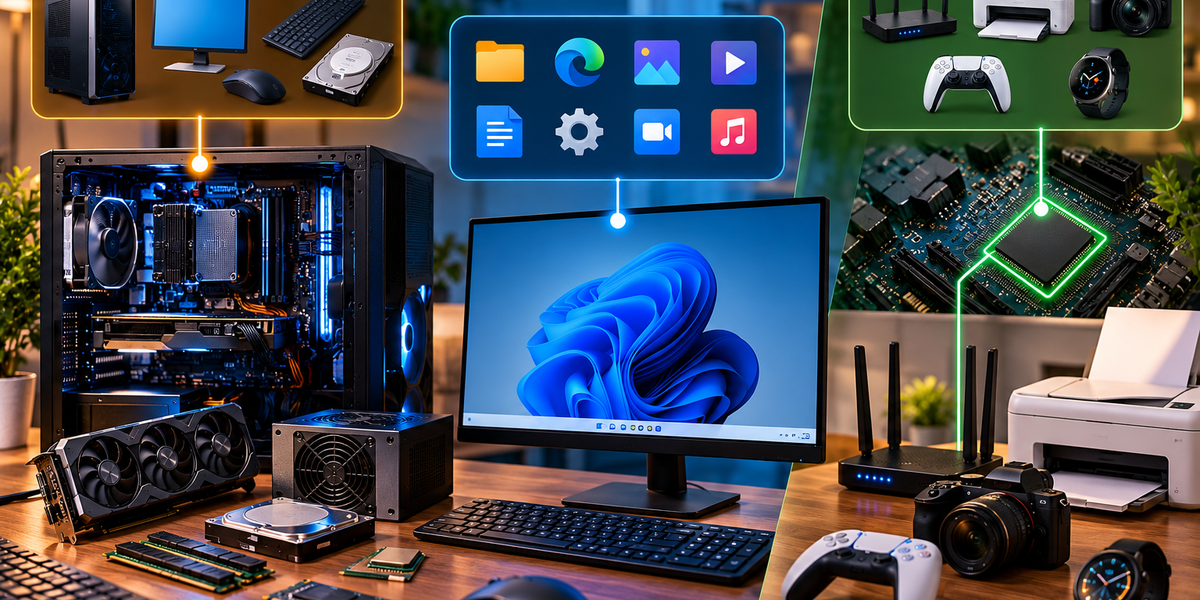
Three terms appear constantly when describing these systems: hardware, software, and firmware. They are closely connected, which is why the distinction between them can sometimes feel unnecessarily technical. In reality, the basic difference is fairly simple. Hardware is the physical equipment, software is the collection of programs and instructions you normally interact with, and firmware is specialized software that helps hardware perform its fundamental functions.
Understanding how these three pieces fit together makes almost every other technology concept easier to understand.
What Is Hardware?
Hardware is the physical part of technology. If you can physically touch a component of a computer or electronic device, it is generally hardware.
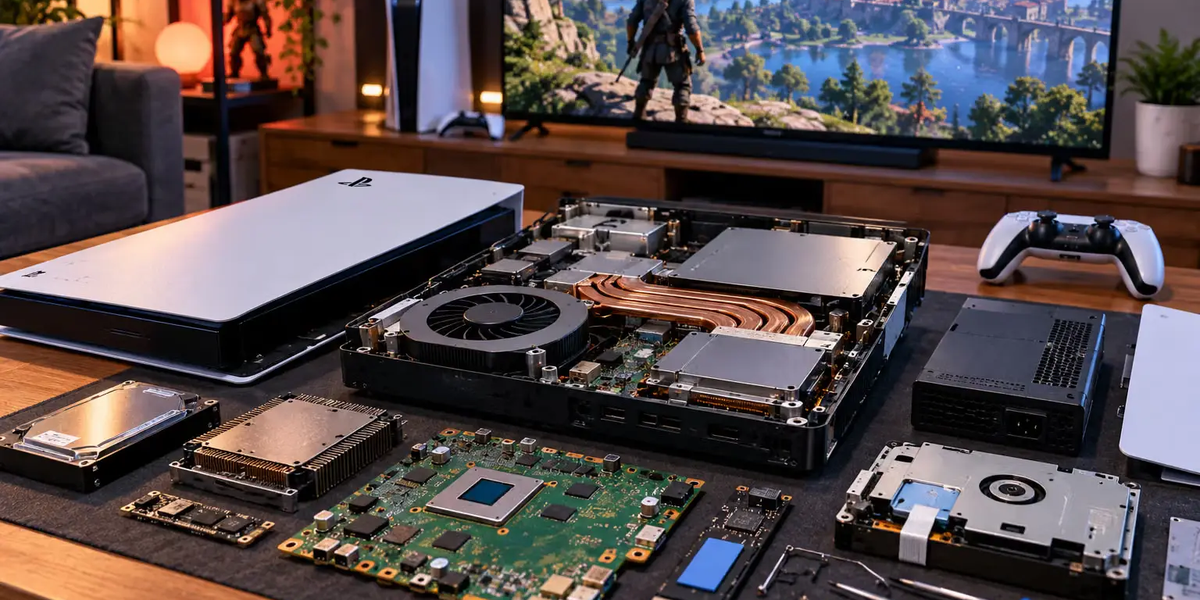
The screen of your smartphone is hardware. So are its battery, cameras, processor, speakers, microphones, buttons, storage chips, and charging port. On a desktop computer, hardware includes the monitor, keyboard, mouse, motherboard, processor, memory, graphics card, storage drive, and power supply.
Hardware does the actual physical work required for computing. A processor performs calculations, memory temporarily holds information that programs are using, storage devices preserve files, and screens turn digital information into visible images. Speakers convert electrical signals into sound, while cameras convert incoming light into digital information.
However, hardware cannot do very much by itself. A processor may be incredibly powerful, but it needs instructions telling it what calculations to perform. A screen can display millions of pixels, but something needs to determine what those pixels should show. This is where software becomes essential.
What Is Software?
Software is the collection of instructions and programs that tell hardware what to do. Unlike hardware, software is not a physical object that you can hold. It exists as digital information stored and executed by electronic devices.
The web browser you use to visit websites is software. So are messaging apps, games, photo editors, spreadsheets, music players, and navigation apps. Operating systems such as Windows, macOS, Android, and iOS are also software, although they perform a much broader role than ordinary applications.
When you open an app, the software sends instructions that eventually cause hardware components to perform specific actions. A photography app might tell the camera hardware to capture an image, ask the processor to process that image, save the resulting file to storage, and instruct the screen to display it.
This relationship explains why software can dramatically change what the same physical device can do. You can install a new program on a laptop without replacing the processor, screen, or keyboard. The hardware remains the same, but new instructions give the machine new capabilities.
What Is Firmware?
Firmware is where things become slightly less obvious because firmware is technically a type of software. The difference is mainly in its purpose and its relationship with hardware.
Firmware consists of specialized instructions stored within an electronic device that help control its basic operations. It usually operates much closer to the hardware than ordinary applications do.
Consider a Wi-Fi router. The router contains physical components such as processors, memory, antennas, and network ports. Inside the router is firmware containing instructions that help those components function together and perform the router’s basic tasks. When the manufacturer releases a firmware update, you are not replacing the router’s physical components. You are updating the low-level software responsible for controlling them.
Firmware can be found almost everywhere, including televisions, cameras, printers, keyboards, headphones, game controllers, smart appliances, vehicles, storage drives, and countless other electronic devices. Many products that people would never describe as computers contain firmware because they contain small computing systems internally.
A Simple Way to Remember the Difference
One useful way to understand the relationship is to imagine a smartphone. The phone itself, including its processor, battery, screen, cameras, and storage chips, is hardware. The operating system and apps are software. Meanwhile, various components inside the phone can have firmware that provides the low-level instructions necessary for those components to operate correctly.
Another analogy is a restaurant kitchen. The physical kitchen, ovens, refrigerators, knives, and pans represent hardware. Recipes and instructions telling the staff what meals to prepare resemble software. Firmware is more like the built-in control system inside a modern oven that determines how its buttons, temperature sensors, heating elements, and safety mechanisms operate.
The analogy is not technically perfect, but it captures the important distinction. Hardware is the machinery, software tells the system what tasks to perform, and firmware helps individual pieces of machinery understand how to function at a fundamental level.
Hardware Needs Software to Be Useful
Imagine buying a brand-new computer containing an excellent processor, plenty of memory, fast storage, and a high-resolution display but no operating system or programs. The machine would contain impressive hardware, yet it would not provide the experience most people associate with using a computer.
Software transforms general-purpose hardware into useful tools. Install a word processor and the computer becomes a writing machine. Install video-editing software and the same hardware becomes an editing workstation. Install a game and it becomes an entertainment system.
This flexibility is one of the defining characteristics of modern computers. The same physical machine can perform thousands of different jobs simply by running different instructions.
Hardware still creates limits, however. Software cannot magically create physical capabilities that a device does not possess. A program cannot take photographs if there is no camera, and demanding software may run poorly if the processor or memory is insufficient. Software determines what hardware is asked to do, while hardware determines what is physically possible.
Software Comes in Different Layers
When people hear the word software, they often think immediately of apps, but software exists at several levels.
Applications are the programs people interact with directly, including browsers, games, messaging platforms, design tools, and office programs. Beneath those applications sits the operating system, which manages the computer’s resources and provides common services that applications need.
The operating system acts as an intermediary between applications and hardware. Instead of every application having to understand exactly how every model of keyboard, display, storage drive, or printer works, the operating system provides standardized ways for programs to interact with those devices.
Additional pieces of software called drivers help the operating system communicate with particular hardware components. A graphics driver, for example, allows an operating system and applications to use the capabilities of a graphics processor.
This layered design prevents every program from having to control every piece of hardware directly.
Where Firmware Fits Into the Picture
Firmware generally sits even closer to hardware. Its job is often to initialize, configure, or directly control a particular device or component.
When you turn on a computer, important processes need to happen before the normal operating system can begin running. The machine needs to identify hardware, perform basic checks, configure components, and determine where the operating system is located.
Computers use firmware such as UEFI to handle many of these early startup responsibilities. Once the necessary hardware has been initialized, the system can begin loading the operating system from storage.
This is why firmware can feel almost invisible. You usually interact with normal software constantly, while firmware works quietly underneath it. Unless you install an update, troubleshoot a device, or enter a computer’s firmware settings, you may rarely think about it.
Why Is It Called Firmware?
The term “firmware” reflects its historical position somewhere between traditional hardware and easily changeable software.
Software is generally designed to be changed frequently. You can install an app, update it, uninstall it, and replace it without changing the physical device. Hardware traditionally sits at the opposite end of the spectrum because changing it usually means physically replacing a component.
Firmware historically occupied a middle position. It was software, but it was stored more permanently within a device and was not intended to change constantly. Early firmware could sometimes be extremely difficult or even impossible for ordinary users to modify.
Modern technology has blurred this distinction because firmware can now frequently be updated electronically. Even so, the term remains useful because it describes software that is tightly connected to the operation of specific hardware.
What Happens During a Firmware Update?
A firmware update replaces or modifies the low-level instructions stored inside a device. Manufacturers release these updates for many of the same reasons software developers release ordinary updates: fixing bugs, improving performance, adding compatibility, introducing features, and correcting security vulnerabilities.
The important difference is that firmware is often essential to the basic operation of the hardware. If an ordinary application update fails, you can often restart the program or reinstall it. If a critical firmware update is interrupted or corrupted, the device may have difficulty functioning at all.
This is why some devices warn users not to turn them off while firmware is being updated. The device may be rewriting instructions it needs in order to start and operate correctly.
Modern devices frequently include recovery mechanisms that make firmware updates safer than they once were, but firmware updates still deserve more caution than updating an ordinary app.
What About Drivers?
Drivers create another source of confusion because they also connect software and hardware. A driver is specialized software that allows an operating system to communicate with a particular hardware device.
Suppose you connect a printer to your computer. The operating system needs to know how to send instructions that the printer understands. A printer driver provides that communication layer.
The important distinction is that drivers normally run as part of the computer’s operating environment, while firmware typically runs on or is closely associated with the hardware device itself.
A printer can therefore have both. Firmware inside the printer controls the printer’s internal behavior, while a driver on your computer helps your operating system communicate with that printer.
Why Hardware Eventually Becomes Outdated
Software can be updated repeatedly, but hardware has physical limitations. A processor has a particular architecture and performance level. Memory has a fixed capacity. A screen has a particular resolution. A battery gradually deteriorates through use.
As software becomes more sophisticated, it may demand more processing power, memory, storage, or graphics performance. Eventually, older hardware may struggle to run newer software efficiently.
This is why a computer that felt extremely fast when it was purchased can feel slow several years later even if nothing is physically broken. The hardware has not necessarily become dramatically worse, but the software ecosystem around it has become more demanding.
Sometimes upgrading individual components can extend a computer’s useful life. In other situations, particularly with highly integrated devices such as smartphones, replacing the hardware may eventually become the only practical option.
Why Software Can Break Without Anything Physically Breaking
One of the strange things about computers is that a device can stop working correctly even when every physical component is perfectly intact.
Software contains enormous amounts of code, and mistakes in that code can create bugs. Different programs can conflict with one another, updates can introduce unexpected problems, files can become corrupted, and incorrect settings can cause applications or operating systems to behave strangely.
This explains why restarting a device can sometimes solve a problem that seems surprisingly serious. Restarting clears certain temporary states and reloads software, giving the system an opportunity to begin again without whatever temporary condition caused the problem.
When restarting does not work, troubleshooting often involves determining which layer is responsible. Is there a physical hardware failure? Is the operating system malfunctioning? Is an application causing the problem? Is a driver outdated? Does the device need a firmware update? Identifying the correct layer makes solving the problem much easier.
Modern Devices Blur the Boundaries
The difference between hardware, software, and firmware is useful, but modern technology does not always fit perfectly into three neat boxes.
A smartphone contains hardware running an operating system, but individual components inside the phone can also contain their own processors and firmware. A modern car can contain dozens of electronic control units running specialized software. Smart televisions combine traditional television hardware with operating systems, applications, networking technology, and firmware.
Even accessories such as wireless headphones can contain processors, memory, sensors, software-like features, and upgradeable firmware. What looks like a simple pair of headphones from the outside may actually contain several tiny computers working together.
As devices become smarter, the boundary between these categories becomes increasingly complicated. However, the basic distinction still provides a useful mental model.
Hardware, Software, and Firmware Work as a Team
The easiest mistake is to think of hardware, software, and firmware as competing categories. In reality, they are different layers of the same technological system.
Hardware provides the physical capability. Software provides instructions and functionality. Firmware provides low-level control that helps hardware operate correctly and communicate with the rest of the system.
When you take a photograph with your phone, all three can be involved. Physical camera hardware captures light. Firmware helps control the camera sensor and related components. The operating system coordinates access to the camera, while the camera application provides the interface you use to take and edit the photograph. The final image appears almost instantly because these layers work together.
The same principle applies to nearly every modern electronic device.
The Difference Is Simpler Than It Sounds
Technology terminology can make ordinary concepts sound more complicated than they are. Hardware, software, and firmware are a good example.
Hardware is the physical equipment. Software is the digital instructions and programs that allow you to perform different tasks. Firmware is specialized software closely tied to hardware that helps devices and components perform their basic functions.
You can think of it as a simple chain: hardware provides the machine, firmware helps the machine know how to operate, and software uses that functioning machine to accomplish useful tasks.
Once you understand those three layers, many familiar technology problems suddenly make more sense. A cracked screen is a hardware problem. An app that keeps crashing is probably a software problem. A router manufacturer releasing an update for the device itself is probably updating its firmware.
Different layers, different jobs, one system—and almost every piece of technology around you depends on all three working together.