
How Cloud Storage Actually Stores Your Data
Saving something “to the cloud” can make it sound as if your photos, documents, videos, and backups disappear into some invisible digital space. You upload a file from your phone, delete the local copy, and somehow it remains available whenever you need it. Open another device, sign into your account, and the same file appears again. It feels almost as though your data exists everywhere and nowhere at the same time.
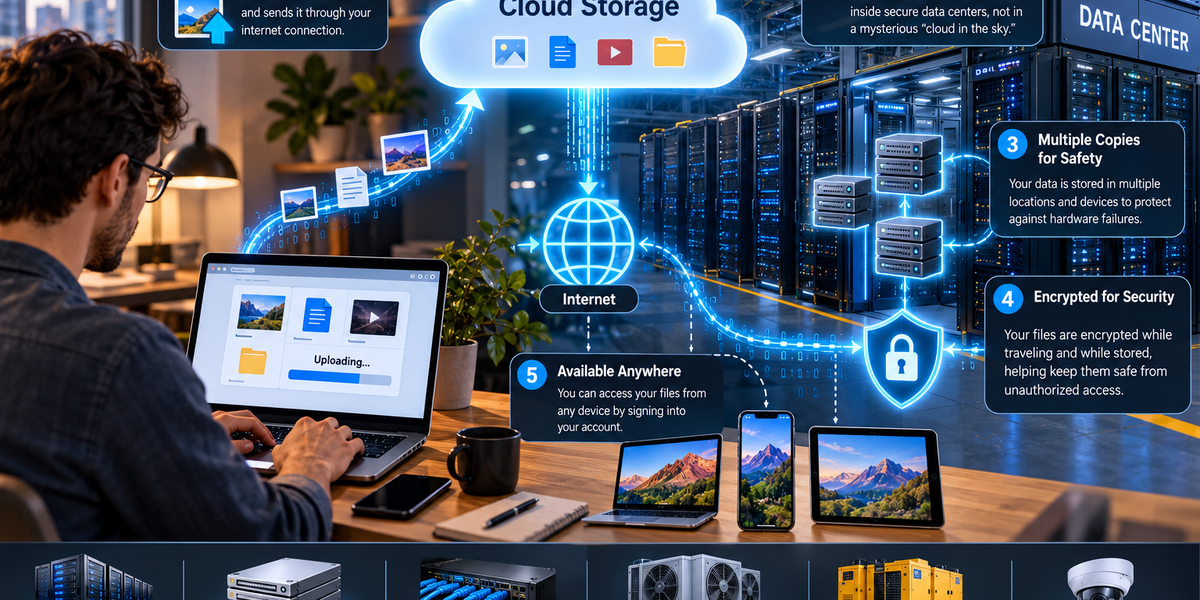
The reality is much more physical. Cloud storage does not store information in the sky, and there is no mysterious digital cloud floating above the internet. Your files are stored on real storage hardware inside real computers located in highly controlled facilities called data centers. What makes the system feel like a cloud is that you do not need to know exactly which machine, storage device, or even physical location is holding your information.
Behind that convenience is an enormous system involving servers, storage drives, networks, encryption, redundancy, databases, backups, and software designed to make billions of files available whenever their owners request them.
The Cloud Is Someone Else’s Computer
One of the simplest explanations of cloud computing is that “the cloud is someone else’s computer.” That description is incomplete, but it captures the basic idea surprisingly well.
When you save a photograph directly to your laptop, the data is stored on hardware inside that laptop. When you upload the photograph to a cloud storage service, the data travels across the internet to infrastructure operated by the cloud provider. The provider stores it on its own equipment and keeps track of which account the file belongs to.
The major difference is therefore not that cloud data somehow stops existing physically. It is that the physical storage is located somewhere else and managed for you.
Instead of worrying about which hard drive contains a particular file, you simply sign into your account and request it. The cloud provider’s systems handle the complicated work of locating and delivering the data.
Your Files End Up in Data Centers
Cloud storage providers operate or use data centers containing large numbers of servers and storage systems. A modern data center can be an enormous facility filled with rows of equipment, networking hardware, power systems, cooling infrastructure, and security controls.
These facilities are designed to keep computers operating continuously. They often include redundant electricity supplies, backup generators, sophisticated cooling systems, fire protection, physical security, and multiple network connections.
That reliability matters because people expect cloud services to work at practically any time of day. If millions of users are storing photographs, business documents, videos, and backups, the provider cannot simply turn off its computers every evening.
Data centers are therefore designed around a basic principle: individual pieces of equipment can fail without bringing down the entire service.
What Happens When You Upload a File?
Suppose you upload a photograph from your phone to cloud storage. Your phone first reads the photograph from its local storage and prepares the data to be transmitted across the internet.
That information is sent through your Wi-Fi or mobile connection, travels across internet infrastructure, and eventually reaches systems operated by your cloud provider. Those systems authenticate your account, process the request, and determine where the incoming data should be stored.
The file may be divided into smaller pieces or objects depending on the provider’s storage architecture. The system then writes the data to physical storage devices and records metadata describing it.
Metadata is information about the file rather than necessarily the contents of the file itself. It might include the file’s name, size, type, creation time, owner, permissions, storage location, or other information needed to manage it.
When the upload is complete, the service can show the photograph in your account even though you have no idea which physical storage device actually contains its data.
Your File May Not Exist as One Neat File on One Hard Drive
It is tempting to imagine a giant data center where every customer has a dedicated hard drive with folders arranged exactly as they appear on their laptop. Large cloud storage systems generally do not work that way.
Cloud platforms use distributed storage systems designed to spread enormous quantities of information across many machines. A single file may be divided into chunks, stored as an object, replicated, encoded for redundancy, or distributed across different pieces of hardware.
The folder structure you see in a cloud storage app may therefore be partly an organizational layer created by software. Behind the interface, the provider’s storage system may manage the actual data in a very different way.
This abstraction is one of the cloud’s greatest strengths. The system can move information between storage devices, replace failing equipment, balance workloads, and expand capacity without requiring you to know where your files physically reside.
Why Cloud Providers Keep More Than One Copy
Hard drives and solid-state drives eventually fail. Servers malfunction. Power supplies break. Network equipment stops working. Entire facilities can experience outages.
If a cloud provider stored your only copy of an important file on one physical drive, cloud storage would be dangerously unreliable.
Instead, cloud storage systems use redundancy. Depending on the service and architecture, data may be replicated across multiple devices or protected using techniques such as erasure coding, which distributes information and recovery data across different storage components.
The goal is similar regardless of the exact method: the failure of one piece of hardware should not automatically destroy your information.
Some services also distribute data across different physical locations or availability zones. This can provide additional protection against larger failures affecting an entire section of a facility or, depending on the service design, a broader geographic area.
Redundancy and Backup Are Not Exactly the Same Thing
This distinction is important because people often assume that storing something in the cloud automatically means it is permanently backed up.
Redundancy protects a service against hardware failures. If one storage device dies, another copy or enough redundant information may still exist to reconstruct the data. A backup, however, is a separate copy designed to help recover information after something happens to the original.
Imagine accidentally deleting an important document. A perfectly synchronized cloud service might quickly synchronize that deletion across your devices. From the system’s perspective, nothing failed. It successfully followed your instruction.
Some cloud services provide trash folders, version histories, snapshots, or recovery periods that can help restore deleted or modified files. However, these features vary considerably between services.
For truly important information, keeping an independent backup remains valuable even when the original files are stored in the cloud.
How the Cloud Finds Your File Again
A large cloud provider may manage billions or even trillions of individual data objects. Finding the correct one quickly requires sophisticated indexing and metadata systems.
When you request a file, the service does not have an employee wandering through a data center looking for the right hard drive. Software systems maintain records connecting your account and file information to the underlying stored data.
Your request is authenticated to make sure you have permission to access the information. The storage system then locates the necessary data, retrieves it from the appropriate infrastructure, and sends it back through the network.
This entire process can happen so quickly that opening a cloud file often feels little different from opening something stored directly on your device.
Why Your Files Sometimes Open Instantly
Cloud services use several techniques to reduce waiting times. One is caching, which temporarily keeps frequently requested information closer to where it is needed.
Another is geographic distribution. Large providers operate infrastructure in multiple regions around the world. Depending on the service, data or cached copies of content may be positioned closer to users, reducing the physical distance information needs to travel.
Network speed still matters. Opening a tiny document requires very little data, while downloading a 50-gigabyte video project requires much more. Even if the cloud provider can retrieve the file instantly, your own internet connection may become the limiting factor.
This is why cloud storage can feel extremely fast for ordinary documents while very large uploads and downloads still take noticeable time.
What Happens When You Sync a Folder?
Cloud synchronization adds another layer of convenience. Instead of manually uploading and downloading files, software watches a folder on your device and communicates changes to the cloud service.
Suppose you edit a document on your laptop. The synchronization software notices that the file has changed and sends the relevant updated information to the provider. When you later open another synchronized device, it receives the newer version.
The process can also work in the opposite direction. Add a photograph from your phone, and it may eventually appear automatically on your computer.
The challenge is keeping multiple copies consistent. If you edit the same document independently on two devices before they have synchronized, the service may need to decide which version is newer or preserve both as conflicting copies.
What looks like a simple folder is therefore supported by a constant conversation between your devices and remote servers.
How Encryption Protects Cloud Data
Storing personal or business information on computers you do not own raises an obvious question: how is that information protected?
Encryption is one of the most important answers. Cloud services commonly use encryption while data is traveling across networks and while it is stored on their infrastructure.
Encryption in transit helps protect information as it moves between your device and the provider’s servers. Encryption at rest helps protect data stored on physical storage systems.
However, not all encryption models are identical. With some services, the provider manages the encryption keys and may technically be capable of accessing data under certain circumstances. Other services offer end-to-end encryption or architectures in which the provider has much more limited ability to access readable content.
This distinction becomes important when choosing cloud storage for particularly sensitive information. Saying that a service “uses encryption” does not, by itself, explain exactly who can decrypt the data.
Your Password Is Not What Encrypts Every File Directly
It is easy to imagine that your account password is simply used as the encryption key for every photograph and document you store. Real systems are generally more complicated.
Cloud platforms use sophisticated systems for authentication, encryption keys, access control, and key management. Your password helps prove that you are authorized to access your account, while separate cryptographic mechanisms may protect the underlying data.
This is also why protecting the account itself matters enormously. Extremely strong storage encryption cannot protect you if someone successfully logs into your account as you.
Using a unique password, enabling multi-factor authentication, and keeping recovery information secure can therefore be just as important as the provider’s underlying encryption technology.
What Happens When You Delete a Cloud File?
Deleting a cloud file is more complicated than physically destroying a storage device.
When you press Delete, the service may first move the file into a trash or recently deleted area. During that period, the data can often be restored. Once the recovery period expires or you permanently delete the file, the service removes your ability to access it through the normal interface.
Behind the scenes, physical deletion can take additional time. Distributed storage systems may contain redundant copies, temporary versions, backups, or other data needed for reliability and disaster recovery. Providers therefore have their own policies governing when deleted information becomes inaccessible and when underlying copies are eventually removed or overwritten.
The important point is that pressing Delete does not necessarily mean every physical trace of a file disappears from every storage device at that exact second.
What Happens If a Server Dies?
Usually, you notice nothing.
That is one of the major achievements of cloud infrastructure. Large distributed systems are designed with the assumption that individual machines will eventually fail.
If a storage device stops working, redundant information elsewhere can keep the data available. Automated systems can detect the failure and begin rebuilding the lost redundancy on healthy hardware. If a server goes offline, requests may be redirected to other machines.
Cloud providers operate at such a large scale that hardware failure is not necessarily an extraordinary event. It is something their systems are designed to expect and manage.
Instead of trying to build computers that never fail, modern cloud infrastructure often focuses on building systems that continue working when individual computers inevitably do.
What Happens If an Entire Data Center Goes Down?
Protecting against the failure of one hard drive is relatively straightforward. Protecting against the loss of an entire facility is more complicated.
Depending on the cloud service and configuration, information and applications can be distributed across separate availability zones or geographic regions. If one location becomes unavailable because of a major power failure, natural disaster, network outage, or other incident, another location may be able to continue providing the service.
However, this level of redundancy is not guaranteed for every cloud product. Some services replicate information automatically, while others require customers to configure additional geographic redundancy themselves.
This is particularly important for businesses using cloud infrastructure. “Stored in the cloud” does not automatically mean “stored everywhere.” The exact resilience depends on how the service has been designed and configured.
Why Companies Use Cloud Storage
Cloud storage solves several difficult problems at once. Companies no longer need to purchase enough physical storage equipment to accommodate every possible future requirement. Instead, they can rent capacity from cloud providers and increase or decrease their usage as necessary.
The provider handles much of the underlying hardware maintenance, replacement, networking, security, and infrastructure management. Organizations can therefore focus more heavily on their applications and data rather than operating enormous storage facilities themselves.
Cloud infrastructure also makes global access easier. Employees can work with the same information from different offices, applications can serve customers in multiple regions, and organizations can create systems that would once have required enormous investments in physical infrastructure.
The cloud does not eliminate computers. It shifts the responsibility for owning and operating many of those computers to someone else.
Is Cloud Storage Safer Than Keeping Files at Home?
There is no universal answer because the risks are different.
A file stored only on your laptop could disappear if the laptop is stolen, damaged, or experiences storage failure. Cloud storage can protect against many of these problems because the information remains on remote infrastructure even if your personal device is lost.
Cloud storage introduces other risks. Someone could gain access to your account, a service could experience a security breach, or you could accidentally delete synchronized information. You also depend on the provider continuing to operate the service and maintaining appropriate security.
For important data, the strongest strategy is usually not choosing between local and cloud storage but avoiding dependence on a single copy or location. Multiple independent copies dramatically reduce the chance that one failure will destroy everything.
The Cloud Is Physical After All
Cloud storage feels almost magical because most of its complexity is deliberately hidden from you. You see a folder, an upload button, and perhaps a storage limit. Behind that simple interface may be thousands of servers, massive storage systems, high-speed networks, encryption infrastructure, monitoring software, backup systems, and teams responsible for keeping everything operational.
When you upload a photograph, the file does not disappear into an abstract digital universe. Its information travels through physical network infrastructure until it reaches computers in a data center. Storage systems record the data, redundancy mechanisms help protect it, databases keep track of where it belongs, and software makes it available whenever you sign into your account.
The clever part of cloud storage is not that your data exists without physical hardware. It is that an enormous amount of physical hardware has been organized so effectively that you rarely need to think about it.
You simply press Save, and somewhere—perhaps hundreds or thousands of miles away—a collection of machines makes sure that when you come back tomorrow, your file is still there.