How AI Image Generators Work (Step by Step)
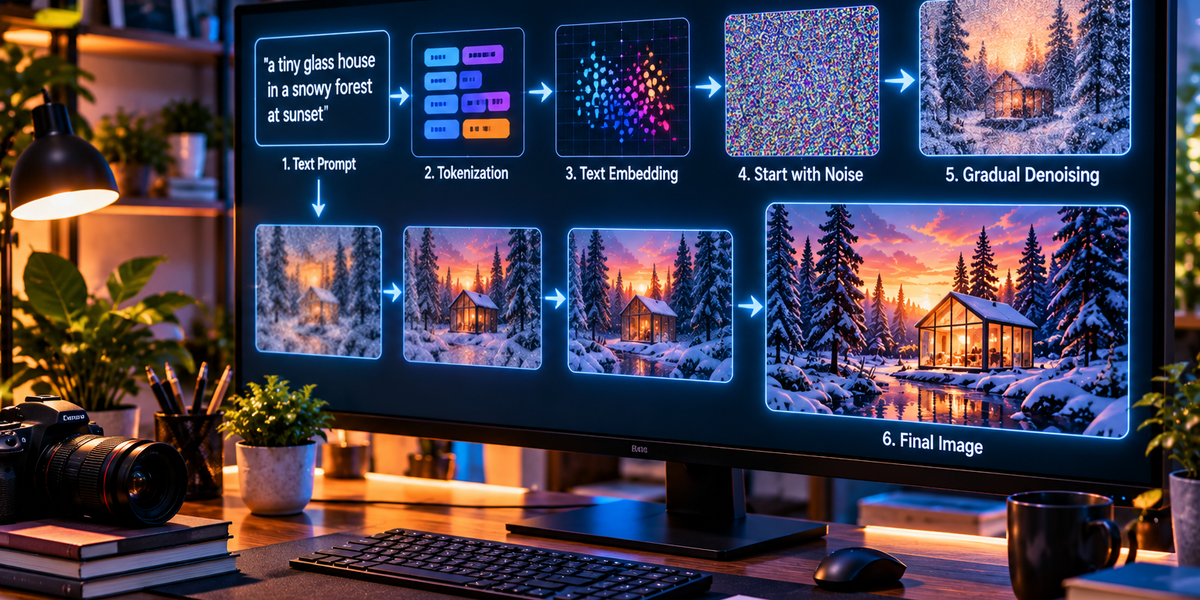
Type a sentence such as “a tiny glass house in a snowy forest at sunset” into an AI image generator, wait a few seconds, and an image can appear that seemingly never existed before. The house may reflect orange light, snow may collect on the branches, shadows may fall across the ground, and the entire scene may look as though someone carefully photographed or illustrated it.
The obvious question is how a computer turns a sentence into a picture.
AI image generation is not as simple as searching through a giant collection of photographs and finding one that matches your request. Modern generators use neural networks that have learned complicated relationships between language and visual information. When given a new prompt, the system uses those learned relationships to construct an image that corresponds to the description.
Several different technologies can be used to generate images, but diffusion-based approaches have played a major role in modern generative AI. The easiest way to understand them is to follow the process from training all the way to the final image.
Step 1: The AI First Has to Learn What Images Look Like
Before an AI system can generate images, it needs to learn visual patterns. During training, the model processes enormous amounts of visual information and learns relationships between features that commonly appear in images.
It gradually becomes sensitive to patterns associated with shapes, textures, lighting, colors, objects, environments, artistic conventions, perspective, and countless other visual properties. It can learn that faces tend to contain particular arrangements of features, that buildings have structural patterns, that shadows relate to light sources, and that snow changes how landscapes usually appear.
Nobody needs to manually program every possible visual rule. The neural network develops useful representations through training.
This is similar to other forms of machine learning: examples are used to adjust the model until it becomes increasingly capable of recognizing and reproducing relevant patterns.
Step 2: The System Learns Relationships Between Words and Images
Generating a random image is not enough. The system needs to understand how your text prompt relates to visual concepts.
During training, image generators can learn from relationships between images and textual descriptions or other forms of labeling. This helps the model connect language with visual patterns.
For example, the concept “dog” becomes associated with visual features commonly found in images described as dogs. “Snow” becomes connected with certain textures, colors, landscapes, and lighting conditions. “At sunset” changes the likely colors and illumination of a scene.
These relationships can become surprisingly detailed. The system can learn distinctions involving objects, materials, locations, compositions, emotions, camera perspectives, and many other concepts.
This does not mean the AI possesses a dictionary containing one fixed picture for every word. Instead, it develops a complicated mathematical representation of how language and visual information relate.
Step 3: Your Prompt Is Broken Into Tokens
When you enter a prompt, the AI cannot process the sentence exactly as a human reads it.
The text is first divided into smaller units called tokens. Depending on the system, a token may represent a complete word, part of a word, punctuation, or another piece of text.
A text-processing model then converts those tokens into numerical representations.
These representations capture relationships between concepts learned during training.
If your prompt contains “red sports car on a rainy street at night,” the system needs to represent not only the individual concepts of car, rain, street, and night but also the relationships between them.
The car should be red. The scene should occur at night. The street should appear rainy.
Those relationships help guide the visual generation process.
Step 4: The Prompt Becomes a Mathematical Representation
After processing the text, the system creates an internal representation of what the prompt means.
This is sometimes described as an embedding.
An embedding represents information in a form the neural network can work with mathematically. Concepts with meaningful relationships can develop representations that reflect those connections.
The system does not literally imagine the requested scene the way a person might.
Instead, it produces a numerical representation containing information useful for guiding image generation.
That representation becomes the instruction set for what the emerging image should resemble.
Step 5: Many Image Generators Begin With Noise
This is where the process becomes particularly strange.
A diffusion-based image generator can begin with something that looks like random television static.
There is no visible house, person, mountain, or car yet. The image is essentially noise.
The model then gradually transforms that noise into a structured picture.
To understand why this works, it helps to look at how diffusion models are trained.
Step 6: Training Teaches the Model to Reverse Noise
Imagine taking a normal photograph and gradually adding random noise.
Add a little noise and the image remains recognizable.
Add more and details begin disappearing.
Continue long enough and eventually the original picture becomes almost completely obscured.
During training, a diffusion model learns how this corruption process behaves and, crucially, how to approximately reverse it.
The model is repeatedly shown noisy information and trained to predict how that information can move toward a cleaner, more structured image.
After enough training, the system becomes extremely good at removing noise in ways consistent with patterns it has learned from images.
This creates the foundation for generation.
Step 7: Generation Runs the Process in Reverse
When generating a completely new image, the model does not need to begin with a photograph.
It can begin with noise.
The model examines that noise and predicts how it should be modified to become slightly more consistent with a meaningful image and the user’s prompt.
It performs one step.
Then another.
Then another.
With each step, random visual information becomes increasingly structured.
Large shapes begin to emerge. Objects become recognizable. Textures develop. Lighting becomes coherent. Smaller details appear.
After enough steps, what began as noise has become an image.
This gradual transformation is why the process is called diffusion.
Step 8: The Text Prompt Guides the Denoising
Without guidance, the model could potentially generate countless kinds of images.
The text prompt tells it which direction to take.
Suppose the prompt says, “a medieval castle on a cliff during a thunderstorm.”
As the system removes noise, the prompt representation influences the decisions being made. Visual patterns associated with castles become more relevant. The scene begins developing structures associated with cliffs, storm clouds, dramatic lighting, and other elements related to the description.
The system repeatedly asks, in mathematical terms, how the current noisy image should change to become more compatible with the prompt.
After many iterations, the result increasingly resembles the requested scene.
Step 9: Attention Helps Connect Words With Parts of the Image
Modern generative systems use attention mechanisms to help connect information from the prompt with visual features.
If the prompt contains several objects, the model needs to understand their relationships.
Consider the description, “a black cat sitting on a red chair beside a window.”
The system needs to associate black with the cat rather than the chair. It needs to associate red with the chair. It also needs to understand that the cat should be positioned on the chair and that the window should appear beside them.
Attention mechanisms help the model establish these relationships during generation.
The process is not perfect, which is why complicated prompts containing many objects and relationships can still produce mistakes.
Step 10: The Image Often Develops From Large Shapes to Fine Details
During generation, the broad structure of an image tends to become established before every tiny detail is resolved.
Early stages may determine the general composition, placement of objects, major color regions, and overall visual structure.
Later stages refine textures, edges, facial details, reflections, clothing, hair, and other smaller elements.
This is somewhat similar to how an artist might begin with a rough composition before adding details, although the underlying process is mathematically very different.
It also explains why early previews from some generation systems can appear blurry or vague before becoming increasingly detailed.
Step 11: Randomness Makes Every Generation Different
If you submit exactly the same prompt several times, you can receive different images.
This happens because generation usually contains an element of randomness.
The starting noise can be different each time.
Since the generation process develops from that initial noise, different starting conditions can lead to different compositions even when the text prompt remains identical.
One version might place the castle on the left side of the image. Another might show it from below. A third might create a wider landscape.
The prompt defines the general direction, while randomness allows many possible interpretations.
Step 12: A Seed Can Make Randomness Reproducible
Many image-generation systems use a value called a seed to initialize the random process.
If the same model, settings, prompt, and seed are used, it may be possible to reproduce the same or a very similar result, depending on the system.
Changing the seed changes the starting noise and can therefore produce a completely different image.
This gives creators an interesting form of control.
The prompt defines what they want, while the seed can influence which particular interpretation emerges.
If someone likes the overall composition of an image, keeping the same seed while adjusting parts of the prompt can sometimes help explore variations around that result.
Step 13: The Model May Work in a Compressed Visual Space
Generating every full-resolution pixel through an enormous neural network would require significant computing power.
Some image-generation systems therefore work in a compressed representation known as latent space.
Instead of manipulating the final image directly, the model performs much of the generation process using a more compact mathematical representation of visual information.
You can think of this as working with a compressed description of the important visual structure rather than immediately processing every individual pixel.
Once the diffusion process is complete, another part of the system converts the latent representation into the final visible image.
This approach can make generation substantially more efficient.
Step 14: A Decoder Turns the Internal Representation Into Pixels
Eventually, the AI needs to produce something your screen can display.
If the model has been operating in latent space, a decoder converts that internal representation into an ordinary image containing pixels.
The result now has recognizable colors, textures, objects, lighting, and details.
Additional processing may improve resolution or refine certain parts of the image.
What began as a text prompt has now passed through language processing, mathematical representations, iterative generation, and decoding before becoming the picture you see.
Why Prompt Details Matter
The prompt is one of the main ways users control generation.
Compare “a house” with “a small abandoned Victorian house surrounded by pine trees during a foggy winter morning.”
The second prompt provides far more information about architecture, scale, environment, weather, season, and atmosphere.
Those details narrow the range of visual possibilities.
The model still decides how to interpret them, but more specific prompts generally provide stronger guidance.
This does not mean longer prompts are always better. An overloaded or contradictory prompt can confuse the generation process.
Clear relationships often matter more than simply adding more words.
Why Style Instructions Work
Users can also describe visual characteristics such as watercolor, cinematic lighting, minimalist illustration, dramatic photography, or hand-drawn texture.
The model has learned associations between language and visual patterns representing different kinds of images.
When the prompt requests a watercolor-like appearance, patterns associated with watercolor imagery become more influential during generation.
The model is not picking a “watercolor filter” in the same way a photo-editing application might.
The requested style can influence the entire generation process, including texture, color, edges, lighting, and composition.
Why AI Sometimes Gets Hands Wrong
Hands became one of the most famous weaknesses of early AI image generation.
The problem makes sense when you consider the enormous variety of ways hands appear in photographs and artwork.
Hands can be open, closed, crossed, partially hidden, holding objects, viewed from unusual angles, or overlapping other fingers. Small errors in structure are immediately noticeable because humans are extremely familiar with what hands should look like.
The AI is not building a hand by consulting an anatomical blueprint containing five fingers and specific bones.
It is generating visual patterns associated with hands.
Modern models have improved considerably because of better training, architectures, and generation techniques, but complicated anatomy can still reveal the difference between learning visual patterns and explicitly constructing a physical body.
Text Inside Images Is Another Difficult Problem
Writing inside generated images has historically been difficult for similar reasons.
An image generator learns what text looks like visually, but producing exact sequences of letters requires additional precision.
A storefront sign cannot merely look like it contains plausible writing. The letters need to appear in exactly the correct order.
Modern systems have become substantially better at generating readable text, but typography remains a useful example of how visual plausibility and symbolic correctness are different problems.
An image can look convincing overall while containing a tiny textual mistake.
Why Multiple People Can Merge Together
Complex prompts can produce another strange failure: attributes can leak between subjects.
Suppose you request “a woman wearing a blue jacket beside a man wearing a red hat.”
The model may occasionally place the red hat on the woman or give both characters blue clothing.
This happens because the system needs to maintain several relationships simultaneously while constructing the scene.
As models improve, their ability to follow these relationships becomes better, but crowded scenes with many specific objects remain more challenging than simple compositions.
AI Does Not Need to Copy One Existing Image
Another common misconception is that an AI image generator simply searches its training data, finds the closest picture, and modifies it.
That is not generally how diffusion generation works.
Training changes the model’s internal parameters so that it learns visual patterns and relationships.
When generating a new image, the system uses those learned patterns to transform an initial representation into a new composition.
This does not mean questions about training data, copyright, memorization, and similarity disappear. Those are important issues, and models can sometimes reproduce or closely resemble patterns from their training data under certain circumstances.
But the general generation mechanism is not equivalent to performing an ordinary image search and assembling a collage.
Image-to-Image Generation Works Differently
Text does not always have to be the only starting point.
Some AI systems can receive an existing image and transform it according to instructions.
Instead of beginning entirely from random noise, the system can preserve information from the original image while modifying selected visual characteristics.
A rough sketch might become a realistic landscape. A photograph might be transformed into an illustration. The background can change while the main subject remains recognizable.
The amount of influence retained from the original image can often be controlled.
This makes generative AI useful not only for creating images from scratch but also for editing and visual experimentation.
Inpainting Lets AI Change One Part of an Image
Inpainting allows a user to select a particular region and ask the model to regenerate only that area.
Imagine a photograph containing an empty table. You could select the table and request a vase of flowers.
The model analyzes the surrounding context and generates new visual information intended to fit naturally into the selected region.
It needs to consider perspective, lighting, shadows, color, and surrounding objects.
A good result should look as though the new object had always been present.
This is one of the most practical uses of generative image technology because it combines traditional image editing with AI-generated content.
Outpainting Expands Beyond the Original Frame
Outpainting does almost the opposite.
Instead of replacing something inside an image, it generates new visual information outside the existing boundaries.
A square landscape can become a wide panoramic scene. The system analyzes the visible image and predicts what could plausibly continue beyond its edges.
It might extend the sky, landscape, architecture, or other elements.
Again, the system is not recovering information that was secretly hidden outside the original photograph.
It is generating a plausible continuation based on the existing visual context.
Upscaling Can Add Apparent Detail
AI can also be used to increase image resolution.
Traditional upscaling enlarges pixels using mathematical interpolation. AI-based upscaling can attempt to reconstruct or generate plausible fine details based on patterns learned during training.
This can make an image appear sharper and more detailed.
However, an important distinction exists between recovering information and inventing it.
If the original image does not contain enough information to determine a tiny detail, an AI upscaler may generate something plausible rather than uncovering the exact original reality.
That difference matters when images are being used as evidence rather than artwork.
Editing Models Need to Understand Both the Image and the Instruction
Modern image-editing AI can accept an existing picture alongside a natural-language request such as “remove the bicycle,” “make the sky cloudy,” or “change the jacket to green.”
This requires combining visual understanding with language understanding.
The system needs to identify which object the instruction refers to, determine which region should change, preserve unrelated areas, and generate replacement content that remains visually consistent.
That is significantly more complicated than applying a conventional filter.
It turns image editing into something closer to a conversation.
Why Generated Images Can Look So Real
Photorealistic AI images benefit from the fact that photography itself contains many repeating patterns.
Cameras produce characteristic depth of field, perspective, lighting, lens effects, noise, reflections, and compositions.
Models trained on large amounts of visual information can learn many of these patterns.
When enough of them appear together correctly, the resulting image can trigger the same visual expectations as a real photograph.
A realistic AI image therefore does not need to simulate every photon bouncing through a physical scene.
It needs to reproduce enough of the visual patterns associated with photography that the result appears convincing.
But Visual Realism Is Not the Same as Physical Accuracy
AI-generated scenes can look realistic while containing impossible details.
A reflection may not correspond perfectly with the room. Shadows may point in inconsistent directions. Architecture can contain impossible geometry. Objects may merge together in subtle ways.
These errors occur because the model is optimizing for a visually plausible result rather than running a complete physical simulation of the world.
Newer models increasingly learn stronger representations of physical relationships, but an attractive image should not automatically be assumed to depict a physically possible scene.
The distinction becomes especially important as generated images become harder to distinguish from photographs.
AI Video Extends the Same Basic Idea Through Time
Generating video introduces another major challenge: consistency between frames.
An image generator only needs to create one coherent moment.
A video generator needs to create many consecutive images while keeping objects, characters, lighting, motion, and environments consistent.
A person cannot suddenly change clothing between frames. A car should continue moving along a plausible path. The camera should move smoothly.
Modern video-generation systems use increasingly sophisticated architectures to model these relationships across both space and time.
The underlying idea remains related to image generation, but the computational and consistency challenges become significantly greater.
The Final Image Is the Result of Many Systems Working Together
When you click Generate, it may appear that one AI simply reads the sentence and paints the picture.
Behind the interface, several components can be involved.
A text-processing system interprets the prompt. Numerical representations encode the requested concepts. A generative model gradually constructs visual information. Attention mechanisms help connect language with parts of the scene. A decoder converts internal representations into visible pixels, and additional systems may improve resolution, safety, prompt adherence, or image quality.
All of this can happen within seconds.
The simplicity of the interface hides the complexity underneath.
From a Sentence to a Picture
The full process becomes much easier to understand when viewed from beginning to end. The user describes an image in ordinary language, the system converts that description into machine-readable representations, and those representations guide a generative model. In a diffusion-style system, generation can begin from noise and progressively transform that noise into structured visual information. Large shapes and compositions emerge, smaller details are refined, and the resulting internal representation is eventually converted into the final image.
The AI does not need a tiny digital artist sitting inside the computer, nor does it usually need to locate one perfect existing picture matching the request. It has learned statistical relationships between language and visual information and uses those relationships to construct something new.
That is what makes AI image generation both surprisingly understandable and technologically remarkable. The basic idea can be explained without advanced mathematics: learn what images look like, learn how words relate to visual patterns, begin with an uncertain visual representation, and repeatedly refine it toward something matching the request.
What starts as a sentence becomes numbers, those numbers guide patterns, the patterns become structure, and the structure eventually becomes pixels.
A few seconds later, there is a picture where there was nothing but a prompt before.