How a Smartphone Actually Works Inside
A modern smartphone is one of the most complicated machines most people carry every day. From the outside, it looks remarkably simple: a thin rectangle with a screen, a few buttons, several cameras, and perhaps a charging port. Tap the screen and an app opens. Point the camera and a photograph appears. Ask for directions and the phone knows where you are. Call someone on another continent and their voice reaches you almost instantly.
Behind that simplicity is an extraordinary collection of tiny components working together. A smartphone contains processors, memory, storage, radios, antennas, cameras, microphones, speakers, sensors, security hardware, power-management systems, and a battery, all controlled by millions of lines of software.
In many ways, a smartphone is not one device at all. It is a computer, camera, GPS receiver, telephone, media player, gaming system, payment device, navigation tool, and collection of sensors compressed into something small enough to fit in your pocket.
Understanding how it works becomes much easier when you look at what is happening inside one layer at a time.
The Main Circuit Board Connects Everything
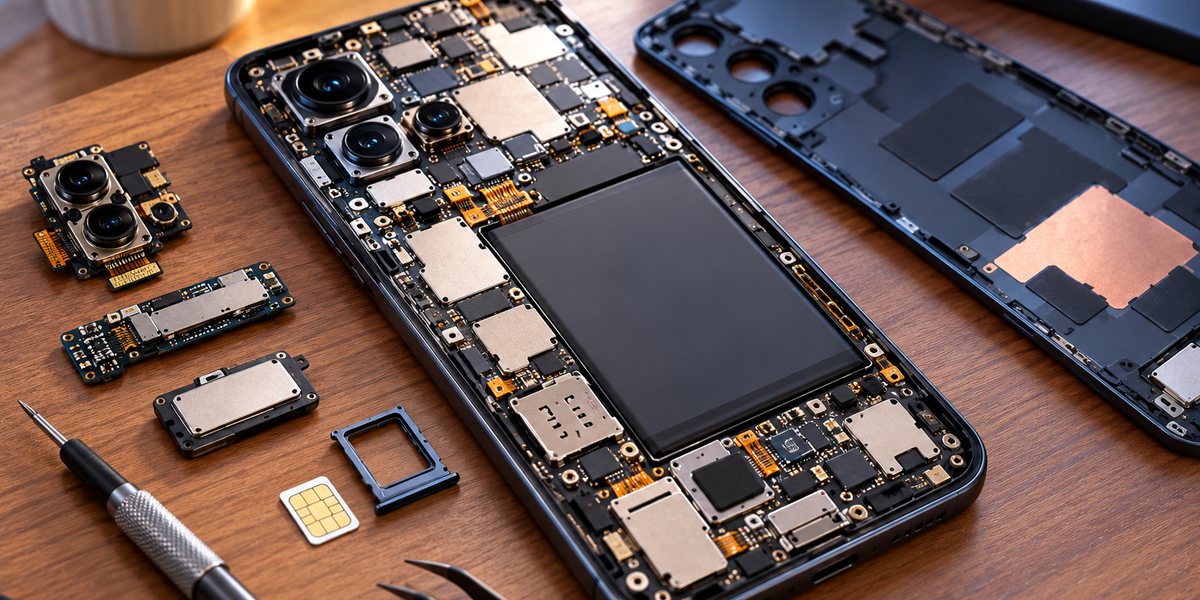
Open a smartphone and one of the most important components you will find is its main circuit board, often called a logic board or motherboard depending on the manufacturer.
This board provides the electrical connections that allow the phone’s major components to communicate. Tiny chips and circuits mounted on it handle processing, storage, wireless communication, power management, audio, security, and many other functions.
The board itself is remarkably compact because space inside a smartphone is extremely valuable. Manufacturers need to fit powerful computing hardware alongside a large battery, multiple cameras, speakers, antennas, sensors, and cooling components while keeping the entire device only a few millimeters thick.
This need for extreme efficiency has driven smartphone engineering toward highly integrated chips that combine functions that once required several separate components.
The Processor Is the Phone’s Main Computing Engine
At the heart of the smartphone is its processor, but modern phones usually contain something more sophisticated than a single traditional CPU.
Most smartphones use a system-on-a-chip, commonly abbreviated as SoC. As the name suggests, an SoC combines several major computing components onto a single piece of silicon.
It usually includes the central processing unit, or CPU, which handles general computing tasks. It also contains a graphics processing unit, or GPU, responsible for graphics and many highly parallel calculations. Modern SoCs may additionally contain specialized processors for artificial intelligence, image processing, security, video encoding, and other workloads.
Integrating these systems onto one chip saves space and can improve performance and energy efficiency because information does not need to travel as far between separate components.
When you open an app, take a photograph, play a game, or edit a video, different parts of the SoC may work together to complete the task.
The CPU Does More Than One Thing at a Time
Modern smartphone CPUs contain multiple processing cores. Instead of relying on a single processing unit to handle every instruction sequentially, the phone can distribute work across several cores.
Not every core necessarily has the same design. Many mobile processors combine high-performance cores with more energy-efficient cores.
The powerful cores can handle demanding tasks such as gaming, complex calculations, or intensive application workloads. The efficient cores can take care of lighter background activities while consuming less electricity.
This arrangement matters because smartphones face a problem desktop computers do not experience to the same degree: they need to provide high performance while running from a relatively small battery and without large cooling fans.
A smartphone processor therefore needs to be powerful when necessary and extremely efficient when it is not.
RAM Is the Phone’s Short-Term Working Space
Your phone contains two different forms of storage that are easy to confuse: RAM and long-term storage.
RAM, or random-access memory, is the phone’s temporary working space. When applications and operating-system processes are actively running, much of the information they need is placed in RAM because the processor can access it quickly.
Imagine working at a desk. The documents spread across the desk represent RAM because they are immediately available while you work. A filing cabinet represents long-term storage because it contains much more information, but retrieving something from it takes additional effort.
More RAM allows a phone to keep more applications and information readily available at the same time. This can make switching between apps smoother because the operating system does not need to reload everything repeatedly.
However, RAM generally loses its contents when the phone is completely powered off. Permanent information therefore needs to be stored elsewhere.
Storage Holds Your Apps, Photos, and Files
The phone’s internal storage preserves information even when the device is turned off.
This is where the operating system, applications, photographs, videos, messages, downloaded files, and other persistent information are kept.
Smartphones generally use flash storage, which has no moving mechanical parts. This makes it compact, fast, and resistant to the kinds of physical movement that would be problematic for traditional spinning hard drives.
When you open a photograph, the phone retrieves its data from storage and may move relevant information into RAM while you are viewing or editing it. When you save changes, updated information is written back to persistent storage.
The storage capacity advertised when you buy a phone refers to this long-term storage rather than RAM.
The Operating System Coordinates Everything
Powerful hardware is not useful without software telling it what to do.
A smartphone operating system, such as Android or iOS, coordinates the device’s hardware and provides the environment in which applications run. It manages memory, storage, networking, security, notifications, background processes, hardware access, and the graphical interface.
Applications generally do not directly control every physical component. Instead, they request access through services and frameworks provided by the operating system.
A camera app, for example, asks the operating system to access the camera hardware. A navigation app requests location information. A music app asks the system to send audio to the speakers or connected headphones.
This layered approach makes the phone easier to manage and significantly improves security because applications can be restricted from accessing hardware or information they do not need.
Your Touchscreen Is Actually Two Systems Working Together
The display you look at and the surface detecting your fingers are related but distinct technologies.
The display creates the visual image using millions of tiny pixels. Modern smartphones commonly use OLED or related display technologies, although other display types also exist.
Above or integrated with the display is a touch-sensitive layer capable of detecting interactions.
Most modern smartphones use capacitive touchscreens. Your finger affects an electrical field associated with the screen, allowing the phone to determine where contact occurred.
The touch controller sends this information to the operating system, which determines what your gesture means.
When you tap an app icon, the phone does not simply detect “open this app.” It detects coordinates representing where your finger touched the screen. Software then determines which interface element occupies that location and what action should follow.
How Your Phone Knows Which Way You Are Holding It
Smartphones contain several tiny sensors that continuously collect information about movement and orientation.
An accelerometer measures acceleration and can help determine how the phone is moving or oriented relative to gravity. A gyroscope measures rotational movement and helps detect how the phone is turning.
These sensors allow the screen to rotate when you turn the device sideways. They also contribute to gaming controls, fitness tracking, camera stabilization, augmented reality, and many other features.
A magnetometer can act like a digital compass by detecting magnetic fields, helping determine direction.
Individually, these sensors provide limited information. Combined through software, they allow the phone to develop a surprisingly detailed understanding of how it is positioned and moving through space.
How the Phone Knows Where You Are
People often say their phone “uses GPS” to determine location, which is true but incomplete.
GPS is one of several global navigation satellite systems that smartphones can use. Satellites transmit precisely timed signals, and the phone’s receiver can calculate its position by comparing signals from multiple satellites.
The phone does not normally send a signal all the way to a GPS satellite and wait for the satellite to locate it. Instead, the satellites broadcast signals, and the phone uses those signals to calculate its own position.
Modern smartphones can also use other satellite navigation systems and combine satellite information with Wi-Fi networks, cellular infrastructure, and device sensors.
This combination can make location faster and more reliable, particularly in cities where tall buildings can interfere with satellite signals.
How a Smartphone Connects to Cellular Networks
One of the defining features of a smartphone is its ability to remain connected while moving across large geographic areas.
Inside the phone is cellular communication hardware, including a modem and radio-frequency components. The device also contains carefully designed antennas capable of transmitting and receiving radio signals.
Your phone communicates with nearby cellular base stations operated by your mobile provider. Those base stations connect into a much larger network that ultimately provides access to telephone services, messaging systems, and the internet.
As you move, the network can hand your connection from one cell to another. This is why you can continue a phone call while traveling without manually reconnecting every few kilometers.
Modern phones may support several generations and frequency bands of cellular technology, allowing them to connect to 4G, 5G, and sometimes older networks depending on local availability.
Wi-Fi Uses Different Radios
Your phone also contains hardware for Wi-Fi communication.
When you connect to Wi-Fi at home, the phone communicates with a nearby wireless router or access point rather than directly using your mobile provider’s cellular network.
The router then connects your local network to the wider internet.
Although Wi-Fi and cellular data both provide wireless internet access, they operate through different network infrastructure and can use different frequencies, protocols, and authentication systems.
Your phone can automatically switch between them depending on availability and settings. From the user’s perspective, the transition can feel almost invisible even though entirely different communication systems are being used.
Bluetooth Handles Short-Range Connections
Bluetooth is another wireless system built into smartphones, but it is designed primarily for relatively short-range communication between nearby devices.
Wireless headphones, smartwatches, keyboards, car entertainment systems, fitness trackers, and many other accessories use Bluetooth.
Bluetooth is designed with power efficiency in mind, particularly through technologies such as Bluetooth Low Energy. This allows small accessories to maintain wireless connections without requiring enormous batteries.
When you connect wireless earbuds, your phone compresses and transmits digital audio using radio signals. The earbuds receive the data, decode it, convert it into an electrical audio signal, and ultimately move tiny speaker drivers to produce the sound you hear.
What feels like “wireless sound” is actually a rapid chain of digital processing and radio communication.
The Camera Is Much More Than a Lens
Smartphone cameras are excellent examples of hardware and software working together.
Light enters through the camera lens and reaches an image sensor containing millions of light-sensitive elements. The sensor converts incoming light into electrical information.
That raw information then passes through an image signal processor and other computational systems.
The phone analyzes color, brightness, noise, focus, motion, and other characteristics before producing the final photograph.
Modern smartphones often capture several images almost simultaneously and combine information from them. Software can balance extremely bright and dark areas, reduce noise, sharpen details, recognize faces, create portrait effects, stabilize images, and adjust colors.
This process is called computational photography.
When you press the shutter button, the photograph you see may therefore be the result of multiple exposures and enormous amounts of computation rather than a single straightforward snapshot.
Why Phones Have Several Cameras
Multiple cameras allow smartphones to overcome some of the physical limitations created by their thin bodies.
Traditional cameras can use large lenses and mechanical zoom systems. Smartphones have very little depth available for optics.
Manufacturers therefore use several camera modules with different lenses and sensors. One might provide an ultrawide field of view, another might serve as the main camera, and another might provide optical telephoto capabilities.
Software can switch between these cameras or combine information from multiple sensors.
This allows a device only a few millimeters thick to imitate some capabilities that would traditionally require much larger photographic equipment.
The Microphone Turns Your Voice Into Data
When you speak into your phone, a microphone converts vibrations in the air into electrical signals.
Those signals are converted into digital information that software can process.
During a phone call, the device can compress the audio data and transmit it across a cellular or internet-based network. The receiving device performs the reverse process, ultimately turning digital information back into sound through its speaker.
Modern phones usually contain several microphones rather than one. Multiple microphones can help distinguish your voice from background noise, improve recording quality, and support features such as directional audio and noise reduction.
Software plays an enormous role here as well. The sound transmitted during a call may be processed extensively before the other person hears it.
The Battery Powers an Extremely Complicated System
Almost everything inside a smartphone ultimately depends on the battery.
Modern phones generally use rechargeable lithium-ion or related battery chemistry because it provides high energy density in a relatively small package.
However, the battery does not simply send electricity indiscriminately to every component. Power-management circuitry carefully regulates how electricity is distributed throughout the phone.
Different components require different voltages and amounts of power. The processor may need more energy during an intensive game than while the phone sits idle. The screen’s power consumption changes with brightness and display technology. Cellular radios may consume more energy when trying to maintain a weak signal.
The operating system constantly makes decisions intended to balance performance and battery life.
This is why reducing screen brightness, limiting background activity, or improving signal conditions can sometimes extend battery life significantly.
Why Smartphones Get Hot
Computing generates heat.
When billions of transistors inside a processor switch rapidly, electrical energy is consumed and some of it becomes heat. The battery, display, modem, and other components can also generate heat during demanding activities.
Desktop computers can use large fans and heat sinks to remove this heat. Smartphones have far less space and generally cannot rely on conventional fans.
Instead, manufacturers use materials and structures designed to spread heat throughout the device. Some phones use vapor chambers or other thermal-management technologies to distribute heat away from concentrated hot spots.
If temperatures rise too far, the phone may reduce processor performance. This is called thermal throttling.
The temporary slowdown protects the hardware and battery from excessive heat.
The Phone Contains Dedicated Security Hardware
Smartphones store some of the most sensitive information people possess, including private messages, photographs, passwords, financial information, authentication credentials, and payment data.
Modern phones therefore include hardware and software specifically designed for security.
Sensitive cryptographic operations and keys can be protected using dedicated secure hardware or isolated processing environments. The exact implementation differs between platforms and manufacturers, but the goal is to prevent important secrets from being easily accessible to ordinary applications or attackers.
Biometric information used for fingerprint or facial authentication can also receive special protection.
When you unlock your phone with your face or finger, the device does not simply compare an ordinary photograph stored in your gallery. Specialized hardware and software process biometric information using protected systems designed specifically for authentication.
NFC Allows Your Phone to Communicate at Very Short Range
Near Field Communication, or NFC, allows compatible devices to exchange information across very short distances.
One of its most familiar uses is contactless payment.
When you hold your phone near a payment terminal, the devices communicate wirelessly using NFC. Payment systems use cryptographic mechanisms and tokenization so the process does not simply broadcast your physical card number through the air.
NFC can also be used for transit systems, access cards, device pairing, digital keys, and other applications.
The extremely short operating range can itself be useful because communication generally requires the devices to be physically close to one another.
Face Recognition Requires Several Systems at Once
Advanced facial authentication demonstrates how many smartphone components can cooperate on what appears to be one simple task.
Depending on the phone, the system may use ordinary cameras, infrared sensors, depth-sensing technology, or other specialized hardware to collect information about your face.
The processor then analyzes that information and compares it with protected biometric data associated with the authorized user.
Security systems need to distinguish between a real person and attempts to fool the device using photographs or other methods.
All of this can happen in a fraction of a second, making the process feel as simple as looking at the screen.
What Happens When You Tap an App?
Consider what happens when you touch an app icon.
The touchscreen detects the position of your finger and sends that information to the system. The operating system determines which interface element you touched and recognizes that you want to open an application.
The system finds the application’s necessary data in storage and loads relevant portions into RAM. The processor begins executing its instructions.
The app may then request access to other systems. A social media app might connect to the internet using Wi-Fi or cellular data. It may retrieve images from storage, display graphics using the GPU, play audio through the speakers, and send notifications through the operating system.
All of these actions happen quickly enough that you simply perceive an app opening.
What Happens When You Make a Phone Call?
Making a call creates another chain of events.
You choose a contact, and the phone retrieves the relevant information. When you start the call, the device communicates with network infrastructure through its cellular connection or, in some cases, Wi-Fi-based calling systems.
Your voice enters the microphone and is converted into digital information. Audio processing systems reduce noise and prepare the signal for transmission. The information is encoded and sent through the network.
At the other end, another device receives the data and converts it back into sound.
Meanwhile, both devices and the network are continuously managing timing, signal quality, error correction, and connection changes.
A conversation feels immediate because this entire process happens with extremely small delays.
Why Your Phone Can Do So Much Without Feeling Complicated
The most impressive feature of a smartphone may not be any individual component. It is how effectively thousands of technologies have been hidden behind a simple interface.
You do not need to understand radio frequencies to make a call. You do not need to manage processor cores to play a game. You do not need to understand satellite timing to use navigation, and you do not need to manually configure an image processor every time you take a photograph.
Software handles that complexity for you.
Modern operating systems create a layer between the person using the device and the extraordinary engineering underneath it. You interact with icons, buttons, gestures, and apps while the operating system coordinates hardware that would otherwise require enormous technical knowledge to control.
A Smartphone Is Really a Collection of Tiny Computers
The idea of a smartphone as one computer is actually somewhat misleading.
Many components contain their own processors or controllers. The main system-on-a-chip handles general computing, while camera systems perform specialized image processing. Wireless modems manage cellular communication. Power-management systems regulate electricity. Security components handle sensitive operations, and sensors can contain their own control electronics.
These systems constantly exchange information while performing specialized tasks.
The result is closer to a miniature network of cooperating computers than a single processor doing everything itself.
Billions of Operations Behind a Single Tap
The remarkable thing about a smartphone is the difference between what happens internally and what the user experiences externally.
You tap a screen.
Behind that tap, sensors detect electrical changes. Software determines where your finger landed. The operating system interprets the gesture. A processor executes instructions. Information moves through memory. Graphics hardware creates an image. The display updates millions of pixels. Wireless radios may exchange data with equipment kilometers away, while security systems quietly verify permissions in the background.
And all you see is an app opening.
A modern smartphone contains technologies that once required entire rooms of equipment, separate cameras, navigation devices, telephones, music players, computers, maps, wallets, and communication systems. Decades of engineering have compressed those capabilities into a device weighing only a few hundred grams.
The smartphone feels simple not because the technology inside it is simple, but because an extraordinary amount of complexity has been engineered specifically so you never have to see it.